Creative wears out. The first week a banner runs, people notice it; by week ten, the same people have seen it a dozen times and scroll past. Audiences wear out too, and often quietly: two segments built by different people end up containing the same shoppers, and your own campaigns bid against each other for them. This example follows a made-up retailer's in-house team using InsightAdScale to catch both.
Larkspur Home's creative and audience team
Larkspur Home (fictional) runs search, social, display, video and native campaigns for its seasonal ranges. Sam leads creative; Ana owns audiences. Every second Thursday they review what is running, what to retire, and which segments to rebuild.
Each creative carries a fatigue score; above 40 it is medium risk, above 70 high, and above 65 it raises a rotation alert. Format and message comparisons show what to make next. The audience overlap matrix and saturation risk show which segments are competing for the same people.
Reading fatigue scores
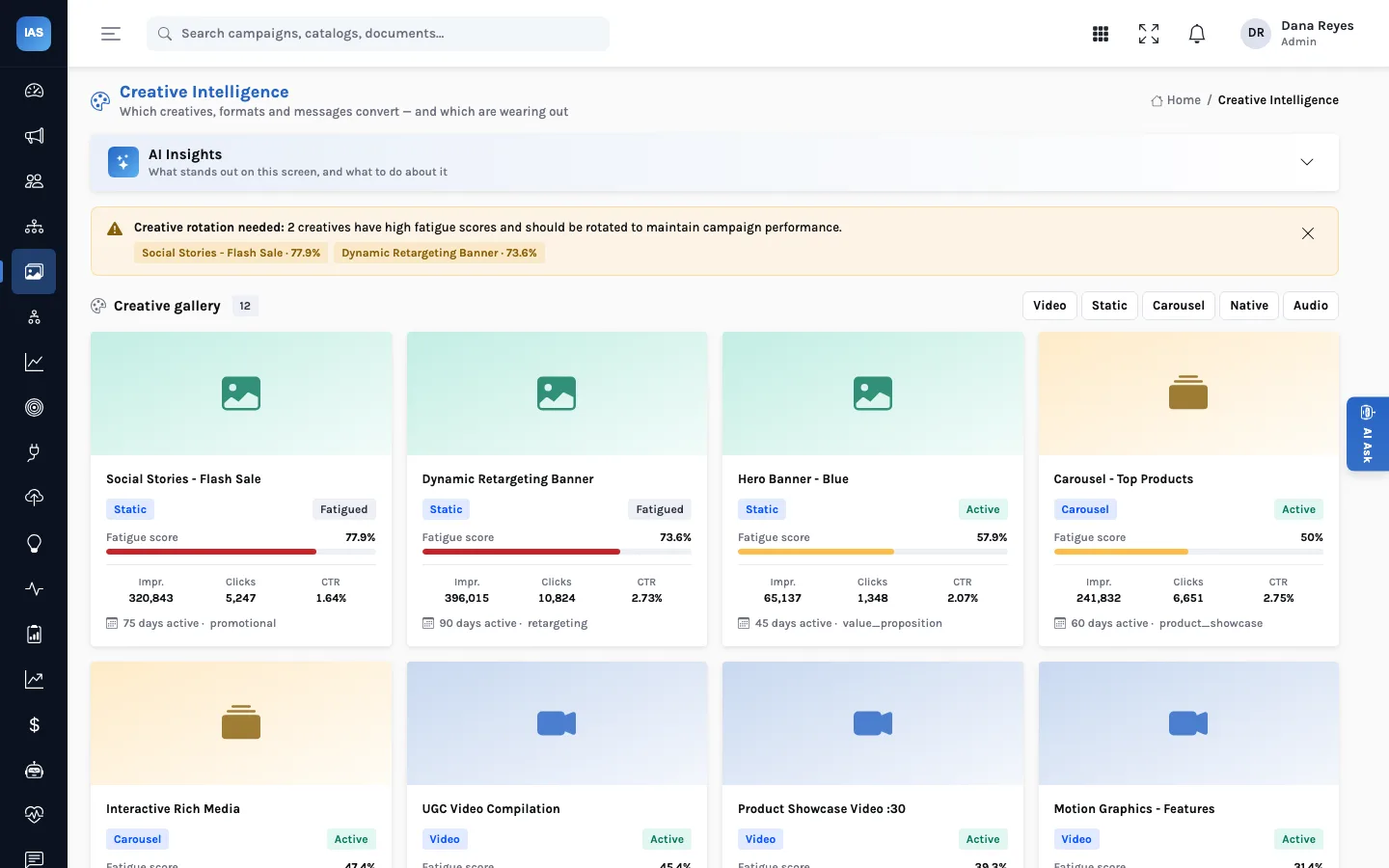
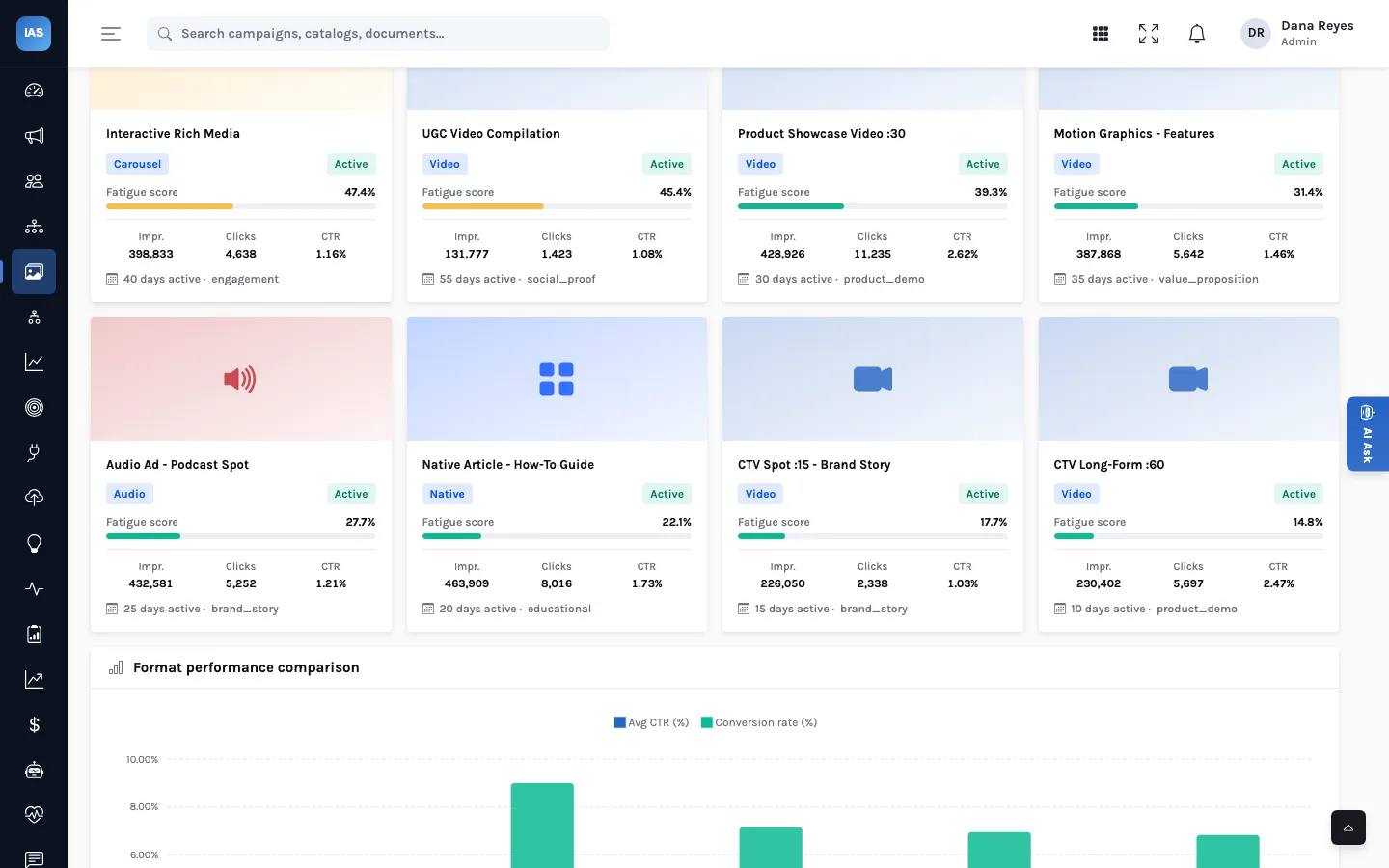
The Creative Intelligence gallery shows every creative with its format, status, fatigue score, impressions, clicks, CTR, days active and messaging theme. Filter by video, static, carousel, native or audio. The fatigue score runs from 0 to 100 and InsightAdScale bands it: over 40 is medium risk, over 70 is high. Any active creative above 65 raises a rotation alert at the top of the screen, naming the creatives and their scores.
Where the score comes from
InsightAdScale stores a fatigue score on each creative record and does the banding, the alerting and the ranking; it does not derive the score itself. The score is loaded with the creative, from your ad-server reporting, a vendor or your own script. That makes the method yours to choose, and worth writing down. One simple, explainable approach is to compare a creative's recent CTR with its CTR in its first weeks and scale the decline to 0 to 100; another is to weight that decline by average frequency. Whatever you pick, use the same method for every creative, or the scores cannot be compared on one gallery.
Reading score and days active together
| Score | Days active | Likely reading | First move |
|---|---|---|---|
| High (over 70) | Long run, months | Worn out: the audience has seen it too often | Rotate in a fresh variant of a theme that converts |
| High (over 70) | Short run, a few weeks | Audience may be too small, or frequency too high | Check the segment's size and saturation before blaming the creative |
| Medium (40 to 70) | Any | Watch list | Schedule a replacement; no need to pull it yet |
| Low (40 or under) | Long run | Still working | Leave it; use its theme as a model for new variants |
A creative's status (active, paused, fatigued or retired) is kept alongside the score. Retired creatives drop out of the fatigue analysis and the rotation alerts, so retiring what you have replaced keeps the alert list honest.
What to make next: formats and messages
Retiring a creative is half the decision; the other half is what replaces it. Further down the screen, Format performance comparison sets average CTR against conversion rate for each format, and the messaging view compares themes: value proposition, product demo, brand story, social proof, promotional and so on. Sam's rule of thumb: replace a fatigued creative with a fresh variant of a theme that is still converting, rather than a fresh version of the theme that wore out.
Audience overlap and saturation
In Audience Explorer, every segment lists its type (behavioural, demographic, lookalike, first-party or contextual), size, match rate, conversion rate, source and saturation risk. The Overlap & Saturation tab draws the overlap between every pair of segments as a matrix: the darker the cell, the more people the two segments share.
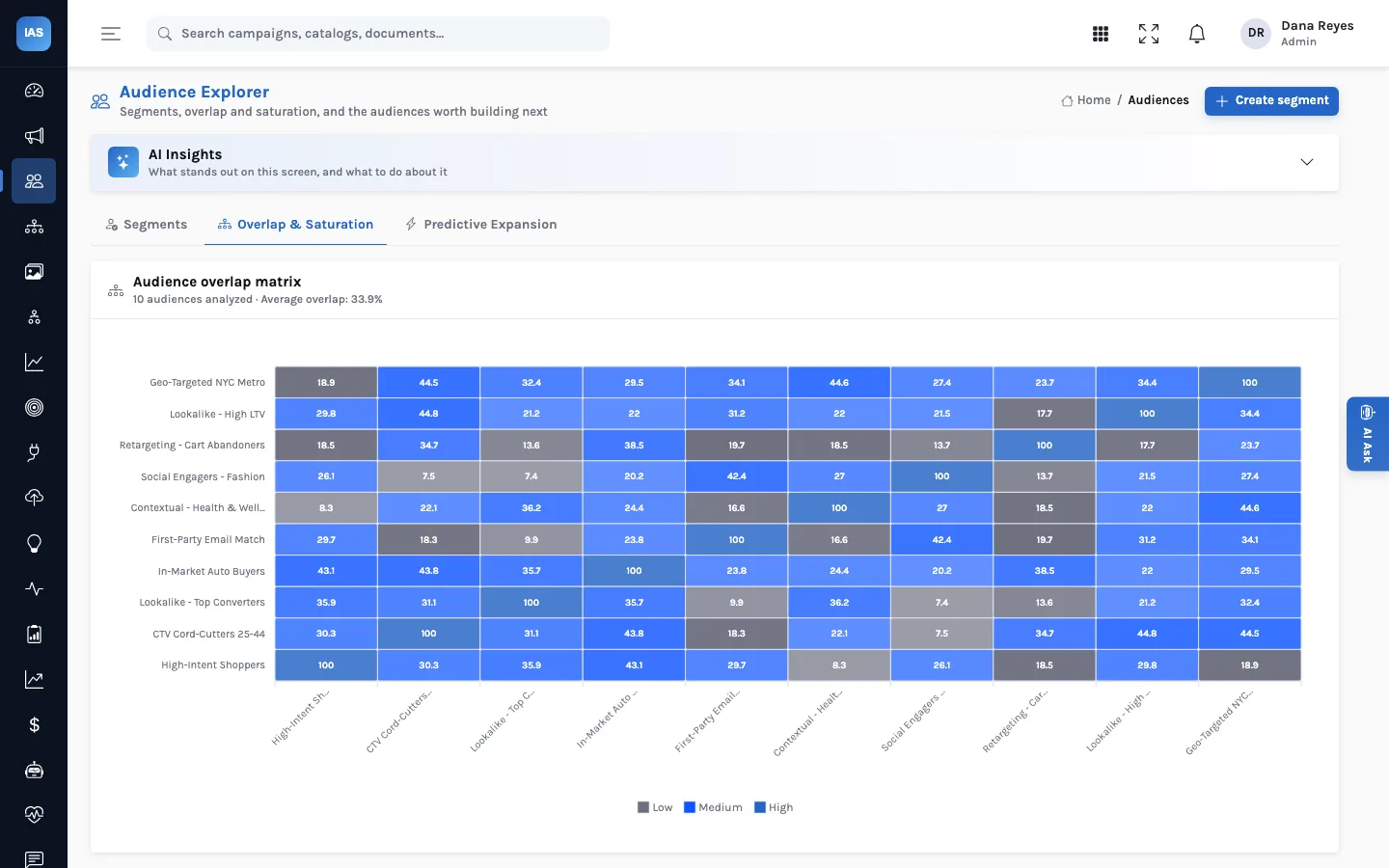
Ana reads it row by row. A broad contextual segment overlaps a lot with several others, and its saturation risk is high: it is inflating bids against Larkspur's own lookalikes. First-party segments, such as the email match and cart abandoners, overlap little and convert best. The fix is usually one of three: narrow the broad segment, exclude one segment from another in the platform, or merge two segments that are really the same people.
Below the matrix, the saturation alerts list every segment at medium or high risk, with its size and overlap score and a suggested next step. That list is where Ana starts when the matrix is not yet fed with real pairwise data.
How the fortnightly review ends
Two retired, one rebuilt, one queued
- Retire the flash-sale social story and the dynamic retargeting banner (both over the alert line). Replace the first with a social-proof variant, the theme converting best this month.
- Keep the hero banner (medium risk) but schedule its replacement for the next range launch.
- Narrow the contextual health segment and exclude it from the lookalike campaign.
- Accept the matching creative-rotation and audience-refinement items in the recommendations queue, so the decisions are on record.
Questions creative teams ask
Can we change the 40, 65 and 70 lines?
Not from the screen in the current build: the risk bands and the rotation-alert line are fixed. If your scoring method runs "hot" or "cold", calibrate the method so its scores mean the same thing as the bands.
Does the screen retire creatives on the ad server?
No. Updating a creative's status in InsightAdScale is a record of the decision; the asset is paused or swapped in the platform by whoever traffics it.
What counts as a messaging theme?
Whatever label you load on the creative. The comparison groups creatives by that label and ranks themes by conversion rate, so agree a short, fixed list of themes before tagging.
A checklist for your own review
- Sort the gallery by fatigue and start with anything above the alert line.
- Check days active next to the score: a high score after a short run may mean the audience is too small, not the creative too old.
- Pick replacements from formats and themes that still convert.
- Scan the overlap matrix for dark cells between segments used by campaigns with different goals.
- Record the decisions in the queue, then make the changes in the platforms.