Most media teams run their week across a handful of platform consoles, a spreadsheet that stitches them together, and a deck that someone rebuilds every Friday. Each console grades its own homework. The spreadsheet is out of date by Tuesday. InsightAdScale exists to replace that patchwork with one place where every channel's spend, return and open questions sit side by side, with the tools to act on them.
InsightAdScale is a cross-channel advertising workspace: platform connections, campaigns, creatives and audiences in one data model, a Command Center across CTV, search, social, display, video, native and audio, six attribution models, a recommendations queue your team accepts or dismisses, and an AI Insights panel on every screen.
Who it is for
InsightAdScale is built for the people who answer for ad spend: media buyers who move budget between channels, marketing analysts who are asked which channel actually worked, creative teams who need to know when a variant has worn out, and the leaders who want one honest view for the quarterly review. Agencies use it across advertisers; in-house teams use it across brands and markets.
How the pieces fit
Everything in InsightAdScale reads from one data model. Platforms (each ad network or DSP you buy through) own campaigns; campaigns carry a channel, objective, budget, spend, advertiser and market; creatives, audiences, metrics, alerts, attribution results and recommendations all hang off those records. Because every screen reads the same records, the spend on the Command Center is the same spend on the Campaign Hub and the same spend the AI summary talks about.
The Command Center
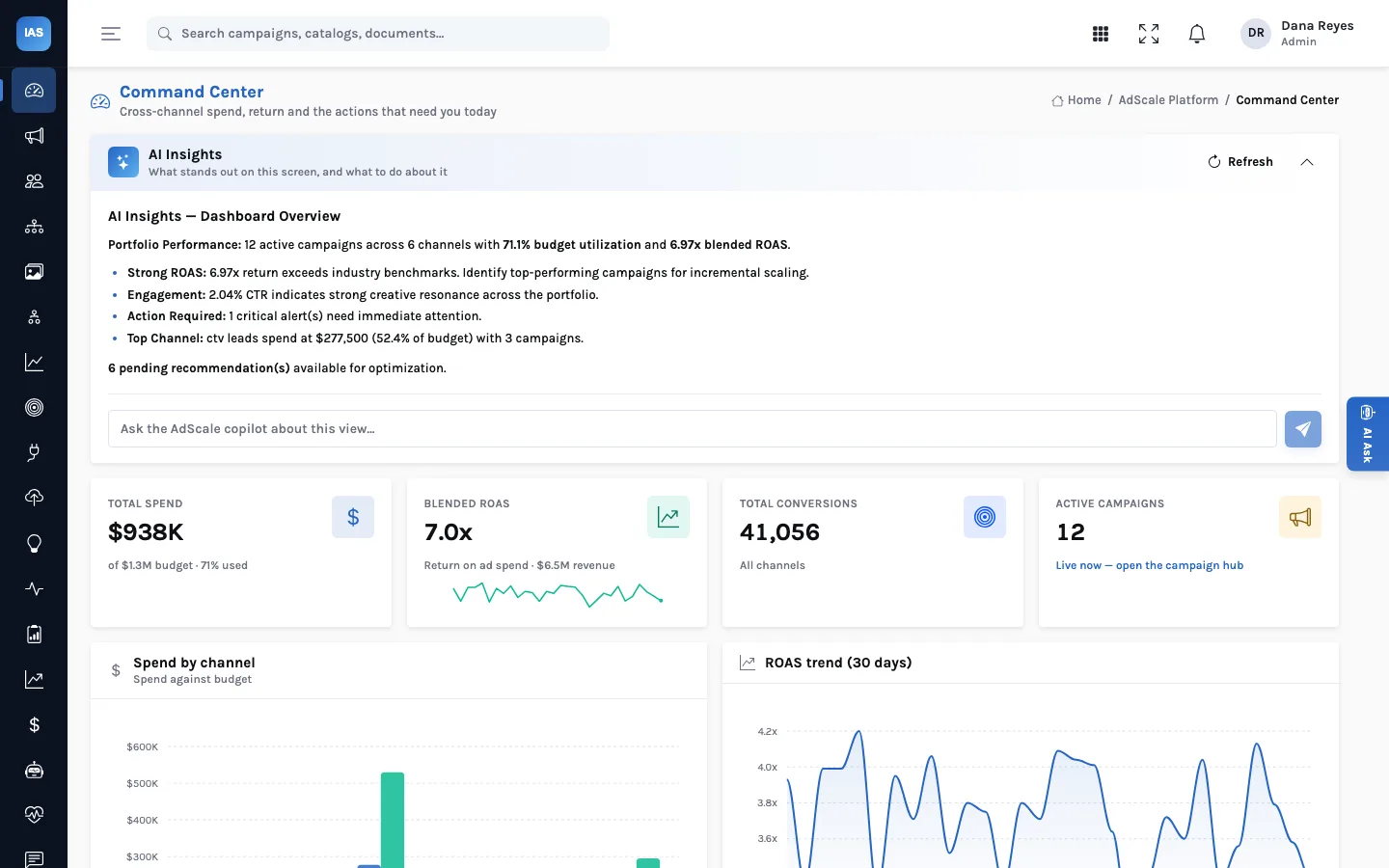
The Command Center is the first screen most people open. Four tiles give total spend against budget, blended return on ad spend, total conversions and the number of active campaigns. Below them, spend by channel is drawn against budget, and a 30-day ROAS trend shows whether the portfolio is improving or drifting. At the top, the AI Insights panel writes a short summary of what stands out: budget utilisation, the channel taking the largest share of spend, critical alerts and how many recommendations are waiting.
Campaigns, budgets and pacing
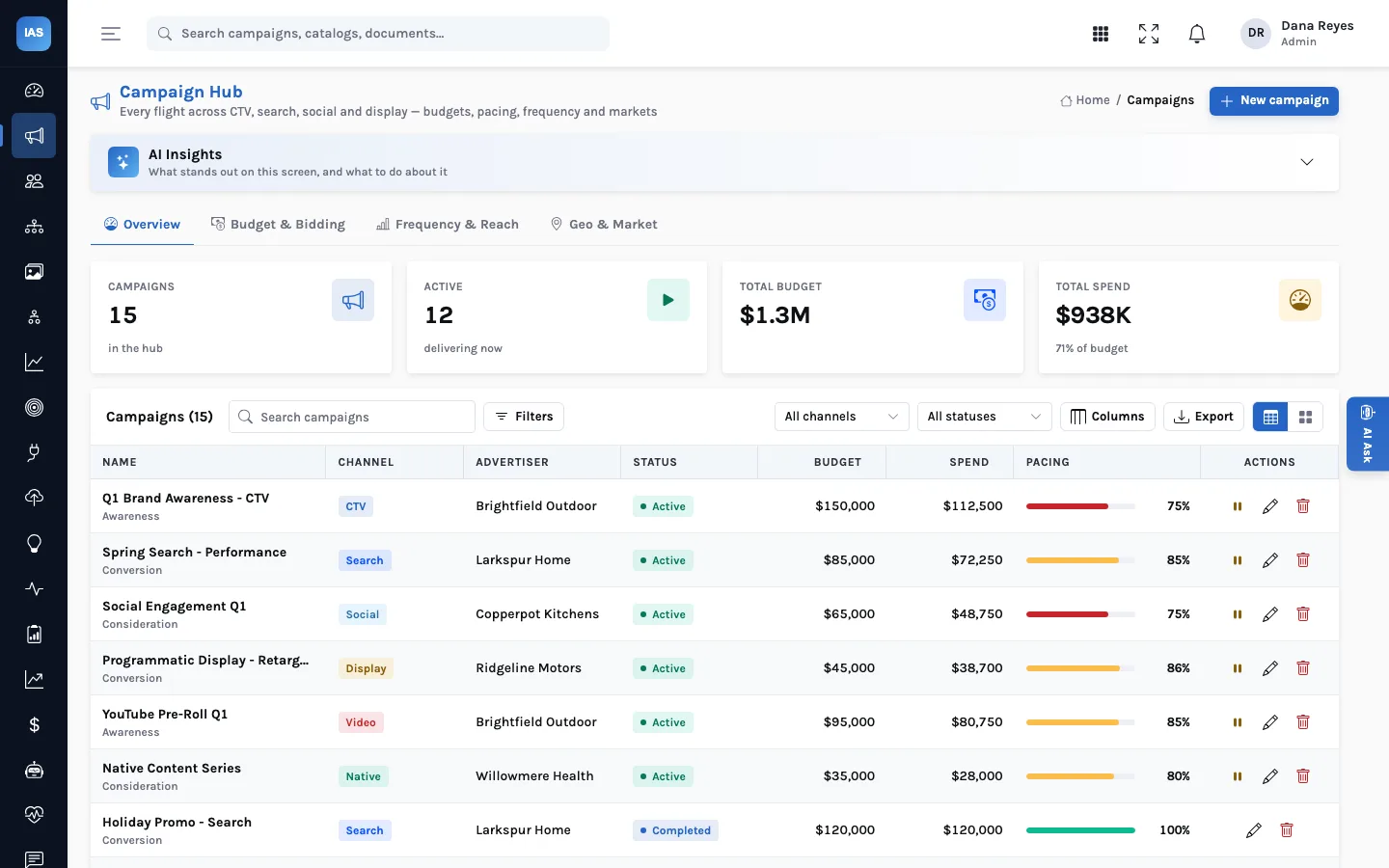
The Campaign Hub lists every flight with its channel, advertiser, status, budget, spend and pacing (spend as a share of budget). Filter by channel or status, choose columns, export the table, or switch to card view. Tabs break the same campaigns down by Budget & Bidding, Frequency & Reach and Geo & Market. Administrators create, edit, pause and remove campaigns; everyone else reads.
Measure, optimise, act
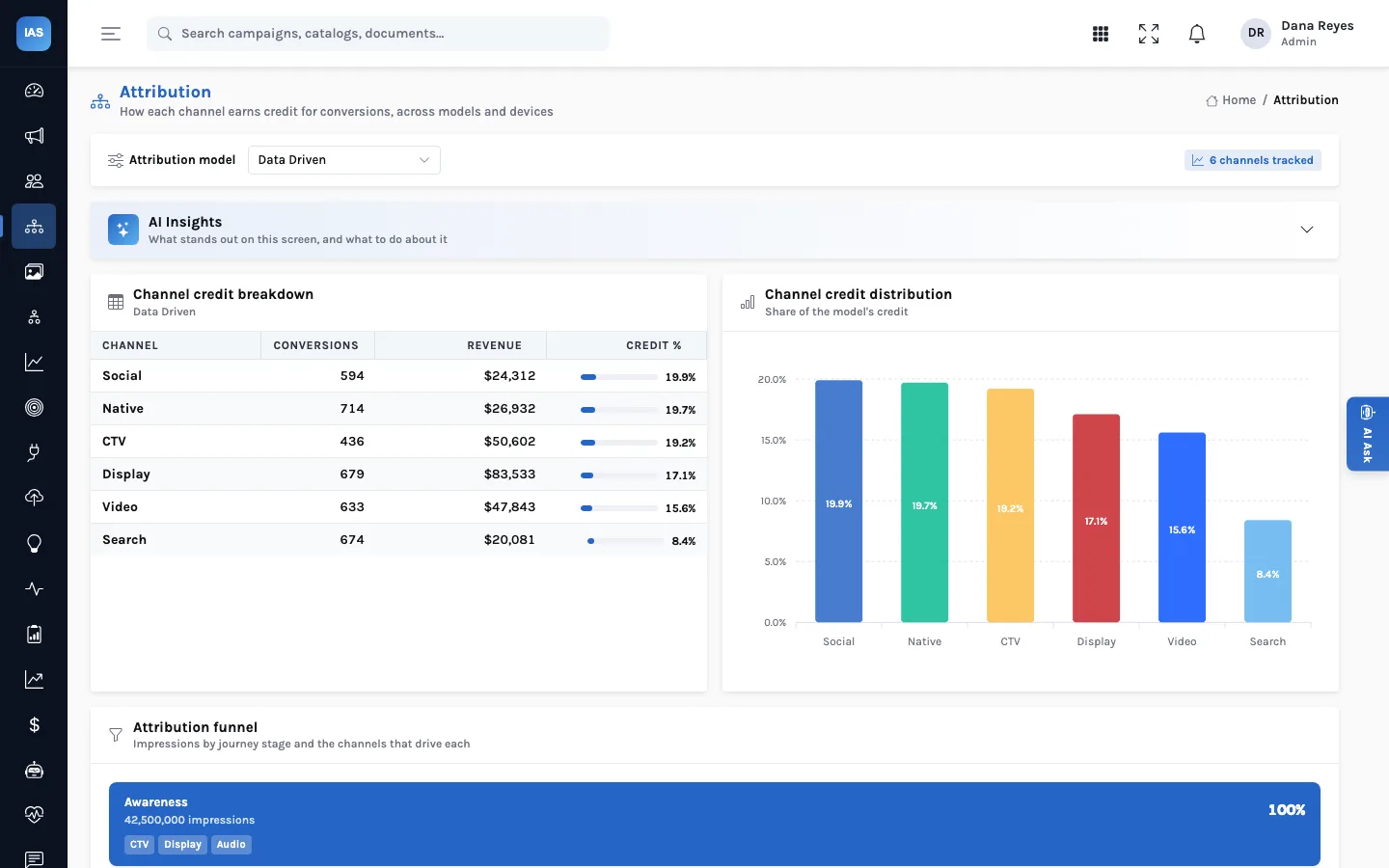
- Attribution shows how each channel earns credit for conversions under six models (last touch, first touch, linear, time decay, position based and data driven), with the journey funnel and CTV-to-digital mapping. How the models differ.
- Creative Intelligence scores each creative's fatigue and raises rotation alerts; Audience Explorer shows segment size, match rate, overlap and saturation.
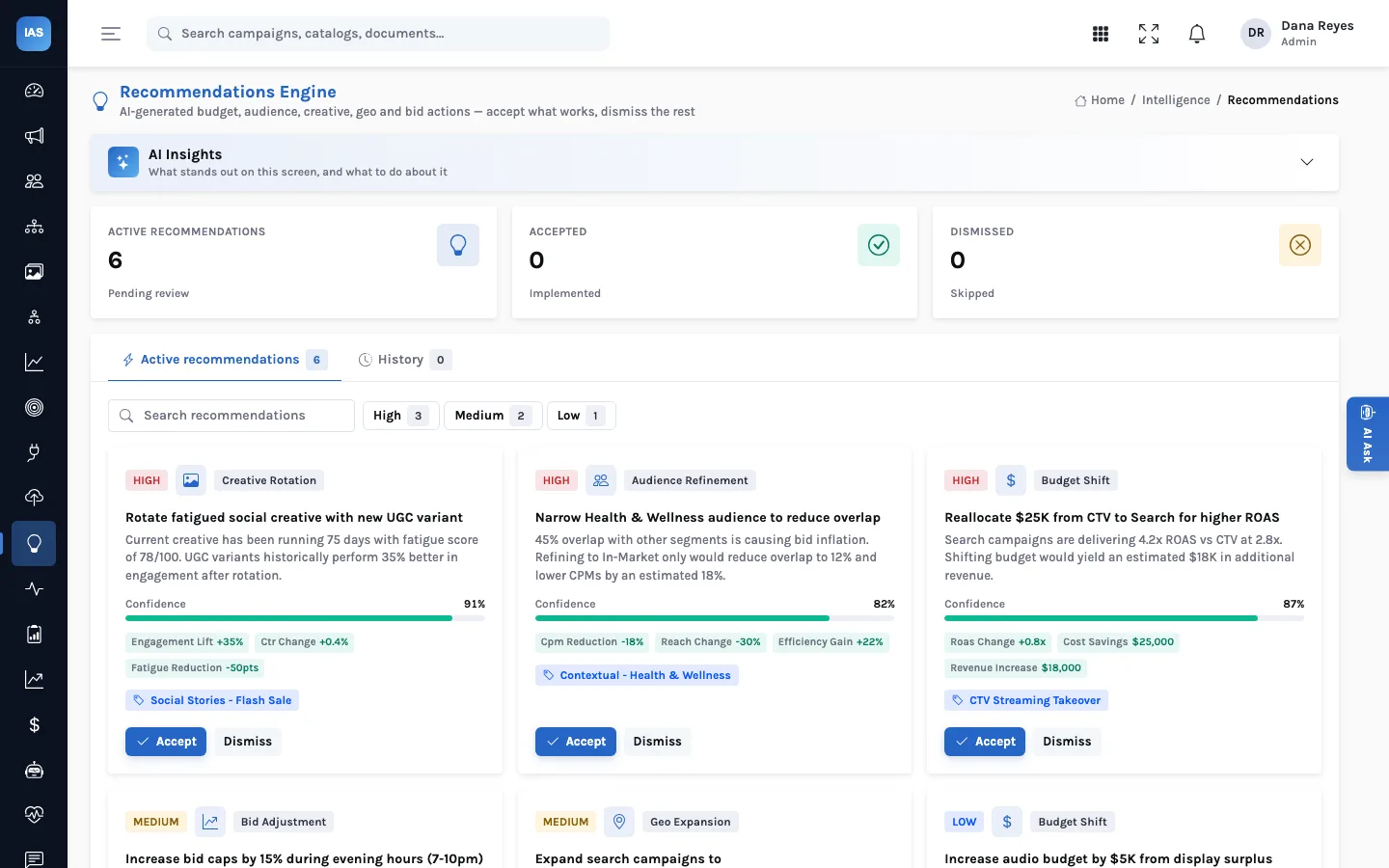
- Recommendations is a queue of proposed budget shifts, audience refinements, creative rotations, geo expansions and bid adjustments, each with a rationale, a confidence and the projected impact. Your team accepts or dismisses each one, and the history is kept. How the queue works.
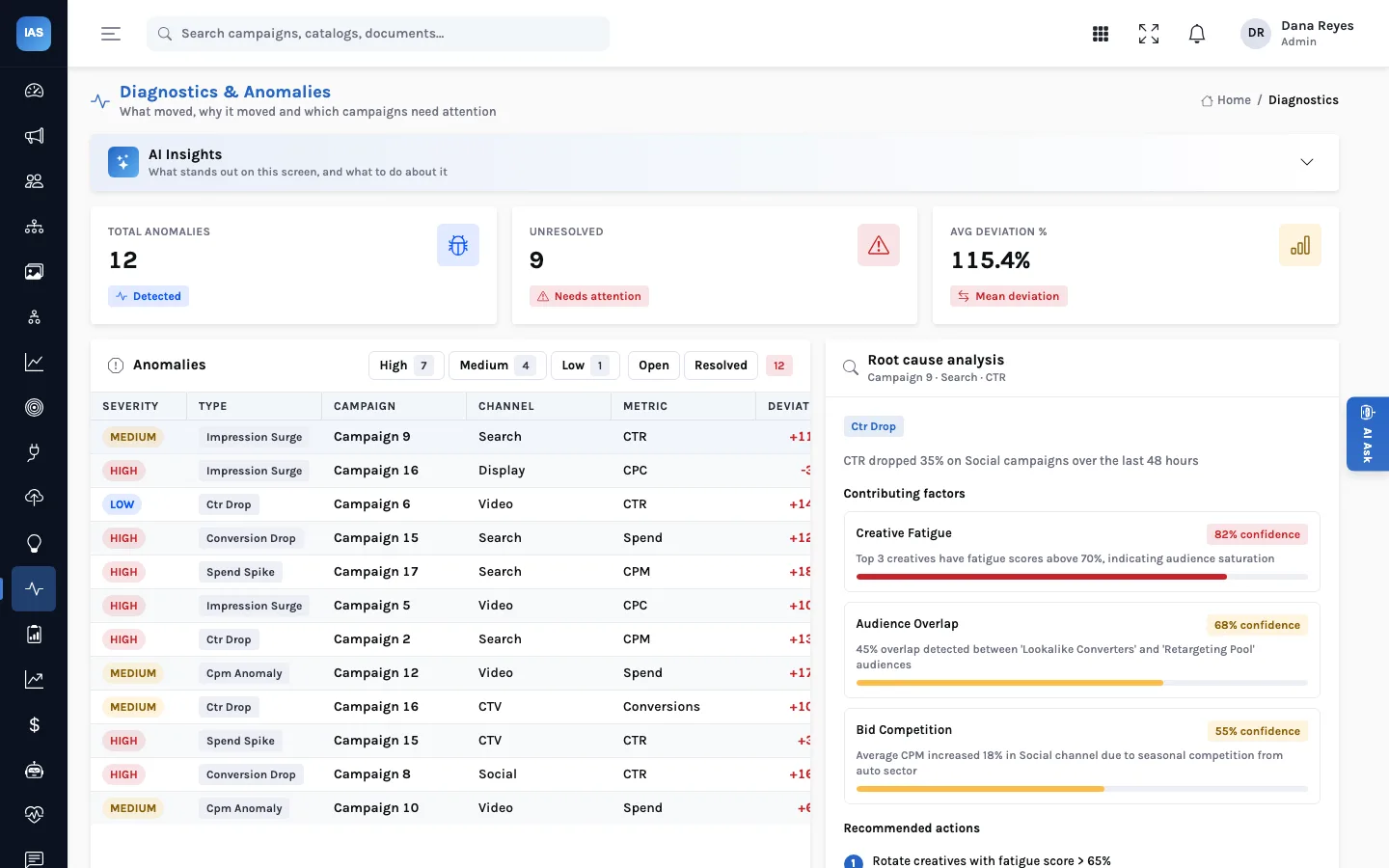
- Diagnostics, Incrementality & Lift, KPI Framework, Identity Graph and the revenue screens round out measurement for analysts and publishers.
AI that shows its sources
Each screen's AI Insights panel is built from the data on that screen: the service gathers the page's records, and writes a summary with a language model when one is configured, or with a rule-based summary when it is not. A copilot box under the summary takes follow-up questions about the same view. More on how that works.
A week in InsightAdScale, by role
The screens are the same for everyone; what changes is the order people open them in. A typical split looks like this:
| Role | Opens first | The question it answers | What they do next |
|---|---|---|---|
| Media buyer | Campaign Hub, sorted by pacing | Which flights are over- or under-spending? | Works the recommendations queue for their flights |
| Marketing analyst | Attribution, then Incrementality & Lift | Which channel's credit depends on the model we chose? | Proposes a lift test, or a budget shift with evidence |
| Creative lead | Creative Intelligence | Which variants have worn out, and what is still converting? | Retires or replaces creatives above the rotation-alert line |
| Audience owner | Audience Explorer | Which segments are saturated or have a low match rate? | Narrows, splits or merges segments |
| Marketing leader | Command Center | Are we on budget and is blended return holding? | Reads the AI summary and the decisions in History |
Because the decisions all land in one place, the leader's last column is the buyers' first: what was proposed this week, who accepted it and why. That is the habit InsightAdScale is built around.
Where it runs
InsightAdScale runs as a hosted service, or inside your own AWS, Azure or Google Cloud account when ad-spend data has to stay in your environment. Sign-in, roles, API keys and audit logs come from the shared Insight platform, with Okta available for single sign-on.
What it does not do, today
It is worth being plain about the edges before you plan a rollout:
- It does not change your campaigns on the ad platforms. Accepting a recommendation records the decision; the buyer makes the change in the platform. Pausing a campaign in the Campaign Hub changes its status in InsightAdScale, not on the network.
- Platform connectors are records, not live pipes yet. Each connector stores its type, endpoint, schedule and sync status, and the Test and Sync buttons are placeholders in the current build. Campaign data is loaded through the campaign form or the API.
- Some measurement screens show sample data. Incrementality & Lift, Identity Graph, KPI Framework and Diagnostics are populated with generated sample data in the current release, and parts of the Campaign Hub's Frequency, overlap and Geo views are built-in samples. The articles on this blog say so wherever they show them.
Is it a fit? A quick check
- You buy across three or more channels and reconcile them by hand each week.
- More than one person makes budget decisions, and you want a record of who decided what.
- Your analysts already produce attribution results, or want one place to compare models.
- Ad-spend data may have to stay in your own cloud account.
If only the first is true, a platform's own reporting may be enough for now. If three or four are, the shared data model and the decision record are where InsightAdScale earns its place.
Questions buyers ask
Do we need a language model for the AI panels?
No. Without one, each panel writes a rule-based summary from the same numbers. With a model configured, the summary is written by the model from that page's data.
Who can change data?
Administrators create, edit and delete connectors, campaigns, creatives, audiences, alerts and recommendations. Other signed-in users read the screens and accept or dismiss recommendations.
Can we start with one advertiser?
Yes. Campaigns carry an advertiser name and a market, so a single advertiser or brand is a sensible pilot; the setup guide covers the order to load things in.
Next: a worked example of a Monday budget review, or the setup guide.